
What are you looking for?
Where did you receive care?
-
MyVirginiaMason has been replaced with the CommonSpirit Patient Portal.
Learn more. -
Virginia Mason Medical Center & regional centers
Log in to Commonspirit Patient Portal > -
All other locations
Log in to VMFH MyChart >
New Patient Portal NOW Live!
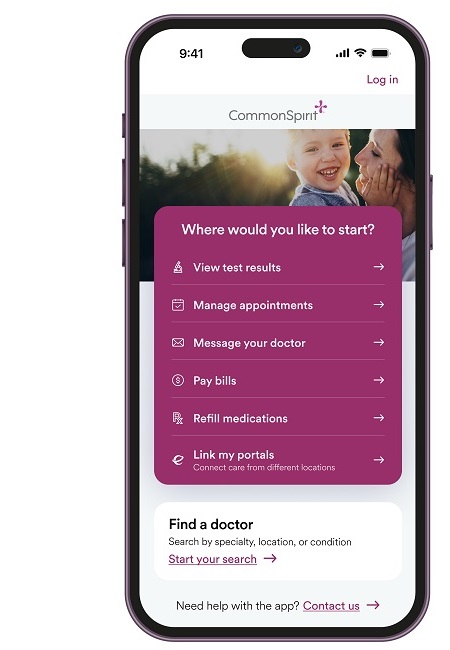
CommonSpirit Mobile App
Download the CommonSpirit Mobile App in the App Store (iPhone) or Google Play (Android), or search for “CommonSpirit-WA” in your app store.
Create a CommonSpirit Patient Portal account (using your web browser).
Please bring your ID and medical insurance card to any upcoming appointments.
Continue Managing Your Health Care With the CommonSpirit Patient Portal and Mobile App
Virginia Mason Franciscan Health (VMFH), including Virginia Mason Medical Center and Virginia Mason clinics, is a member of CommonSpirit Health, a national health system caring for patients and supporting healthier communities across the country.
Together we have launched the CommonSpirit Patient Portal and Mobile App, where you can access your health information and manage your care. The CommonSpirit Patient Portal replaces MyVirginiaMason.
This change is the first step toward a unified patient portal for all VMFH patients.
While the portal you use to access your health information online has changed, your care has not. You will continue to receive care from the same trusted providers.
Ready to set-up your new account? Find your step-by-step instructions here:
What You Can Expect
Virginia Mason patients will now use the CommonSpirit Patient Portal, powered by MyChart, to access and manage your health information. Certain Virginia Mason clinics/departments have transitioned to the VMFH MyChart portal and patients should sign up for both the VMFH MyChart and the CommonSpirit Patient Portal. See which clinics/departments those are below.
You will continue to receive care from the same trusted providers. While the patient portal you use to access your health information online is changing, your care is not.
You will automatically receive an activation link or code to set up your new patient portal account by text or email before your next scheduled appointment or if you receive test results. There is no need to do anything
If you would like to create an account before you receive an activation link or code, click the button below for step-by-step instructions.
- If you receive care at multiple VMFH locations, you may need to use two patient portals, a CommonSpirit Patient Portal, powered by MyChart and a VMFH MyChart account. Learn how to set up and link MyChart accounts to manage your care.
Ways to Get Started with the CommonSpirit Patient Portal
Choose from one of the options below to create an account:
Activation Link or Code: You’ll be invited automatically through an activation link or code sent to you by email or text:
- Before your next scheduled appointment
- When your test results are ready
- During check-in, check-out or discharge, staff may ask if you want an activation code sent by text or email
- Sign up for the CommonSpirit Patient Portal without an activation link or code
Linking patient portal accounts
If you already use VMFH MyChart, you’ll be able to connect your MyChart accounts using these step-by-step instructions.
Certain Virginia Mason clinics/departments have transitioned to the VMFH MyChart portal and patients should sign up for both the VMFH MyChart and the CommonSpirit Patient Portal. The Virginia Mason departments that transitioned to VMFH MyChart are:
- St. Anne Hospital Asthma, Allergy and Immunology at Virginia Mason Medical Center – Seattle (Lindeman Pavilion, Suite 101) formerly Asthma, Allergy and Immunology at Virginia Mason
- St. Anne Hospital Hematology and Oncology at Virginia Mason Medical Center – Seattle (Buck Pavilion, Suite 200) formerly Hematology and Oncology at Virginia Mason
- St. Anne Hospital Infusion at Virginia Mason Medical Center (Buck Pavilion, Suite 200) formerly Virginia Mason Medical Center – Infusion Center
- St. Anne Hospital Palliative Care at Virginia Mason Medical Center – Seattle (Buck Pavilion, Suite 200) formerly Virginia Mason Medical Center Palliative Care
FAQs
-
Virginia Mason Franciscan Health (VMFH), including Virginia Mason Medical Center and Virginia Mason clinics, is a member of CommonSpirit Health, a national health system caring for patients and supporting healthier communities across the country. On May 2, we launched the CommonSpirit Patient Portal and Mobile App, where you can access your health information and manage your care.
If you receive care at the following Virginia Mason clinics/departments, you have transitioned to VMFH MyChart and should also sign up for the CommonSpirit Patient Portal and Mobile App.
- St. Anne Hospital Asthma, Allergy and Immunology at Virginia Mason Medical Center – Seattle (Lindeman Pavilion, Suite 101) formerly Asthma, Allergy and Immunology at Virginia Mason
- St. Anne Hospital Hematology and Oncology at Virginia Mason Medical Center – Seattle (Buck Pavilion, Suite 200) formerly Hematology and Oncology at Virginia Mason
- St. Anne Hospital Infusion at Virginia Mason Medical Center (Buck Pavilion, Suite 200) formerly Virginia Mason Medical Center – Infusion Center
- St. Anne Hospital Palliative Care at Virginia Mason Medical Center – Seattle (Buck Pavilion, Suite 200) formerly Virginia Mason Medical Center Palliative Care
All other Virginia Mason Franciscan Health locations will continue using VMFH MyChart.
-
CommonSpirit Health is a national health system caring for patients and supporting healthier communities across the country. As a mission-driven network with more than 2,300 clinics, 137 hospital-based locations and home-based and virtual care services, CommonSpirit strives to improve the health of the people we serve.
-
Your historical medical information will be transferred to the CommonSpirit Patient Portal once you sign up for an account. You can also continue to access your historical health information on the read-only MyVirginiaMason portal for the time being.
New health information occurring on or after May 2, including upcoming appointments, test results, provider messaging and more are available in the CommonSpirit Patient Portal and Mobile App once you create an account.
-
As VMFH continues its integration with CommonSpirit, we are dedicated to making your care experience even better. We know the healthcare environment is complicated — but your experience with your health information doesn't have to be.
The CommonSpirit Patient Portal and Mobile App are designed to simplify and improve your experience through a single, secure destination to manage your health online. This brings us one step closer to a unified EHR experience for all VMFH patients.
-
No. While the MyVirginiaMason portal you use to access your health information online is changing, your care is not. You will continue to receive care from the same trusted providers.
-
Good news! Once you sign up for the CommonSpirit Patient Portal and download the Mobile App, you can easily link your VMFH MyChart account and view all health information from VMFH with one simple log-in.
-
The benefits and capability of the CommonSpirit Patient Portal and Mobile App will look familiar to you and provide:
- 24/7 access to medical records, test results, visit notes and care plans
- Appointment scheduling and management
- Pre-check in capability
- After-visit summary access
- Secure communications with your care team
- Prescription refill requests
- Online bill pay
-
Simple instructions on how to download the app and create an account can be found on our website.
-
Yes. Virginia Mason Franciscan Health will continue to use the VMFH MyChart portal for many locations. You can find instructions on how to link your accounts on our webpage.
-
Now that the CommonSpirit Patient Portal and Mobile App are live, you will receive messages and notifications from CommonSpirit Health, including important check-in processes, reminders, test results and more.
Messages from CommonSpirit are from the same physicians and caregivers you trust with your care.
-
Yes. We take your privacy very seriously. The patient portal uses secure, industry-standard technology to protect your personal health information. Only you and your authorized caregivers can access your account, and all data is encrypted to prevent unauthorized access.
-
Our dedicated support team will be available to assist you with any questions or technical issues. You can reach them at (844) 528-8383.
-
We don’t expect all of our patients to sign-up overnight. You will continue receiving communications and reminders across multiple touchpoints, on an ongoing basis. However, if you have used MyVirginiaMason and want to be able to manage your care online, you will need to create a CommonSpirit Patient Portal account.
-
We understand that not everyone has access to technology or feels comfortable using it. You can still access your health information and manage your care by contacting your care team's office directly by phone. We are committed to ensuring that everyone has access to the care and information they need, regardless of their technological preferences.
-
You will be able to view your historical health information in the previous MyVirginiaMason portal until April 29, 2027 by going to virginiamason.org/myvirginiamason and logging in with your prior username and password.
Online bill pay is also accessible through MyVirginiaMason for services received before May 2, 2026.
To continue to manage your care online, you need to use the new CommonSpirit Patient Portal. Following your next care appointment, new health information—such as appointments, test results and messages—will appear in the CommonSpirit Patient Portal.
-
We want to be clear: There have been no security issues and no patient data has been breached as a result of the electronic health record transition.
-
If you receive care at Virginia Mason Medical Center or Virginia Mason clinics, you will generally use the CommonSpirit Patient Portal. If you receive care at other Virginia Mason Franciscan Health locations, including some specialty services at Virginia Mason Medical Center, you may need to use two patient portals, a CommonSpirit Patient Portal, powered by MyChart and a VMFH MyChart account. Learn how to set up and link MyChart accounts to manage your care.
You will need a VMFH MyChart account for the following locations:
- St. Anne Hospital Asthma, Allergy and Immunology at Virginia Mason Medical Center – Seattle (Lindeman Pavilion, Suite 101) formerly Asthma, Allergy and Immunology at Virginia Mason
- St. Anne Hospital Hematology and Oncology at Virginia Mason Medical Center – Seattle (Buck Pavilion, Suite 200) formerly Hematology and Oncology at Virginia Mason
- St. Anne Hospital Infusion at Virginia Mason Medical Center - Seattle (Buck Pavilion, Suite 200) formerly Virginia Mason Medical Center – Infusion Center
- St. Anne Hospital Palliative Care at Virginia Mason Medical Center – Seattle (Buck Pavilion, Suite 200) formerly Virginia Mason Medical Center Palliative Care
-
A healthcare proxy (also called a healthcare agent or Power of Attorney for Healthcare) is the person you choose to make healthcare decisions for adults and minors. Your proxy can talk with your doctors, consult your medical records, and make decisions about tests, procedures, and other treatment.
Proxy access to manage healthcare for minor and adolescent patients online through a patient portal involves specific consent requirements, especially for adolescents (ages 13-17), due to Washington State law.
For questions about proxy access, please contact your care team.
Child Proxy Access: Ages 0-12
To request proxy access for your child, please complete this form and return it to your care team in person. Child Proxy Request Form (ages 0-12).
Children under the age of 13 are not able to have their own MyChart account, so a parent or legal guardian must create their own CommonSpirit Patient Portal account to set up proxy access.
Once proxy access is granted, the child’s health information will appear in the parent/legal guardians CommonSpirit Patient Portal account.
If you previously had proxy access for a minor, or wish to establish new proxy access, you will need to complete the necessary paperwork at your next visit.
Adolescent Proxy Access: Ages 13-17
In Washington State, adolescent patients (ages 13-17) must consent to allow a parent or guardian to have proxy access to their patient portal. If the adolescent does not consent, proxy access cannot be granted. Patients in this age group can have their own MyChart account with access to some, but not all, of their healthcare information.
To obtain or maintain proxy access for an adolescent, both the parent/guardian and the adolescent must sign consent forms. These forms ensure compliance with patient confidentiality and state regulations.
To request proxy access for your adolescent, please complete this form and return it to your care team in-person. Adolescent Proxy Request Form (ages 13-17)
An adolescent patient retains the right to revoke proxy access at any time.
For adolescent patients (13-17), setting up a portal account requires a unique email address and phone number for the adolescent. The parent/guardian's email or phone number cannot be used for the adolescent's primary account. They will need a unique activation message to create their own CommonSpirit Patient Portal account, and a front desk team member can send the activation message to them.
If granted proxy, their full health information will appear in their parent/legal guardians account.
If you previously had proxy access for an adolescent minor, or wish to establish new proxy access, you will need to complete the necessary paperwork.
Adult Proxy Access: Ages 18 and older
For adult patients, they can grant proxy access to another adult directly from within their own CommonSpirit Patient Portal account account.
-
- To request a prescription refill, please call your retail pharmacy directly.
- Your pharmacy will then process your request and work with your provider if additional authorization is needed.
-
We are ready to assist you.
- For portal or mobile app technical issues: Call (844) 528-8383
- For scheduling support: Call (206) 479-5714, Option 2 or 3
- For general IT help desk support: Call (844) 528-8383
- For a patient clinical concern or complaint: Call (877) 426-4701
-
We understand that some patients have experienced challenges accessing their new CommonSpirit Patient Portal and App patient portal. In June 2026, we implemented a system update Patient Portal/App login process to address access issues experienced by some patients. This update requires all CommonSpirit Patient Portal users to reset their password and Mobile App users to perform an App update and a password reset.
To ensure you continue to have access to the CommonSpirit Patient Portal, you will need to reset your password and update your mobile app. For step-by-step instructions on how to reset your password and update the app, visit vmfh.org/portal-updates.